Mobile Banking App Redesign – Homepage & Money Management Features
Mobile Banking App Redesign – Homepage & Money Management Features
A redesign initiative for a mobile banking app aimed at transforming the homepage experience and introducing smart money management tools. The goal was to empower users with better control over their finances through intuitive design, personalized insights, and goal-oriented features.
A redesign initiative for a mobile banking app aimed at transforming the homepage experience and introducing smart money management tools. The goal was to empower users with better control over their finances through intuitive design, personalized insights, and goal-oriented features.
NOTE - SCROLL DOWN TO VIEW MORE
Client
Bank X
CAtegory
Fintech
ARTIST
Shota Gogoladze
Product Duration
3 Months
Project Scope
The project aimed to redesign the homepage of a mobile banking app and introduce new money management modules to enhance user engagement and financial control. The scope included UX research, feature ideation, wireframing, UI design, and user testing, focusing on usability and utility for users seeking better expense tracking, goal-setting, and reward systems.
The project aimed to redesign the homepage of a mobile banking app and introduce new money management modules to enhance user engagement and financial control. The scope included UX research, feature ideation, wireframing, UI design, and user testing, focusing on usability and utility for users seeking better expense tracking, goal-setting, and reward systems.
The project aimed to redesign the homepage of a mobile banking app and introduce new money management modules to enhance user engagement and financial control. The scope included UX research, feature ideation, wireframing, UI design, and user testing, focusing on usability and utility for users seeking better expense tracking, goal-setting, and reward systems.
Problem Statement
Users found the existing homepage cluttered and unhelpful in terms of tracking personal finances. While the app supported basic banking operations, it lacked intuitive tools for managing expenses, setting savings goals, and understanding financial habits. This led to low engagement with the app beyond core transactional features.
Users found the existing homepage cluttered and unhelpful in terms of tracking personal finances. While the app supported basic banking operations, it lacked intuitive tools for managing expenses, setting savings goals, and understanding financial habits. This led to low engagement with the app beyond core transactional features.
Users found the existing homepage cluttered and unhelpful in terms of tracking personal finances. While the app supported basic banking operations, it lacked intuitive tools for managing expenses, setting savings goals, and understanding financial habits. This led to low engagement with the app beyond core transactional features.
Research & Discovery
We conducted a mixed-method research approach, including:
User Interviews: Interviewed 10 frequent mobile banking users aged 20–45 to understand their financial habits and pain points.
Competitive Analysis: Evaluated money management features from leading fintech apps like Revolut, Monzo, and Yolt.
Surveys: Collected quantitative data from over 100 users on what features they value in financial apps.
Key Insights:
Users wanted a more visual and summarized homepage.
There was a strong demand for automated categorization of expenses.
Many users lacked financial literacy and needed actionable insights and encouragement to save money.
We conducted a mixed-method research approach, including:
User Interviews: Interviewed 10 frequent mobile banking users aged 20–45 to understand their financial habits and pain points.
Competitive Analysis: Evaluated money management features from leading fintech apps like Revolut, Monzo, and Yolt.
Surveys: Collected quantitative data from over 100 users on what features they value in financial apps.
Key Insights:
Users wanted a more visual and summarized homepage.
There was a strong demand for automated categorization of expenses.
Many users lacked financial literacy and needed actionable insights and encouragement to save money.
We conducted a mixed-method research approach, including:
User Interviews: Interviewed 10 frequent mobile banking users aged 20–45 to understand their financial habits and pain points.
Competitive Analysis: Evaluated money management features from leading fintech apps like Revolut, Monzo, and Yolt.
Surveys: Collected quantitative data from over 100 users on what features they value in financial apps.
Key Insights:
Users wanted a more visual and summarized homepage.
There was a strong demand for automated categorization of expenses.
Many users lacked financial literacy and needed actionable insights and encouragement to save money.
Ideation & Design Process
The design process followed a user-centered approach:
Persona Creation: Developed user personas to guide empathy-driven design.
Feature Prioritization Workshop: Collaborated with stakeholders to define MVP features.
Sketches & Wireframes: Created low-fidelity wireframes to iterate on information hierarchy.
UI Design:
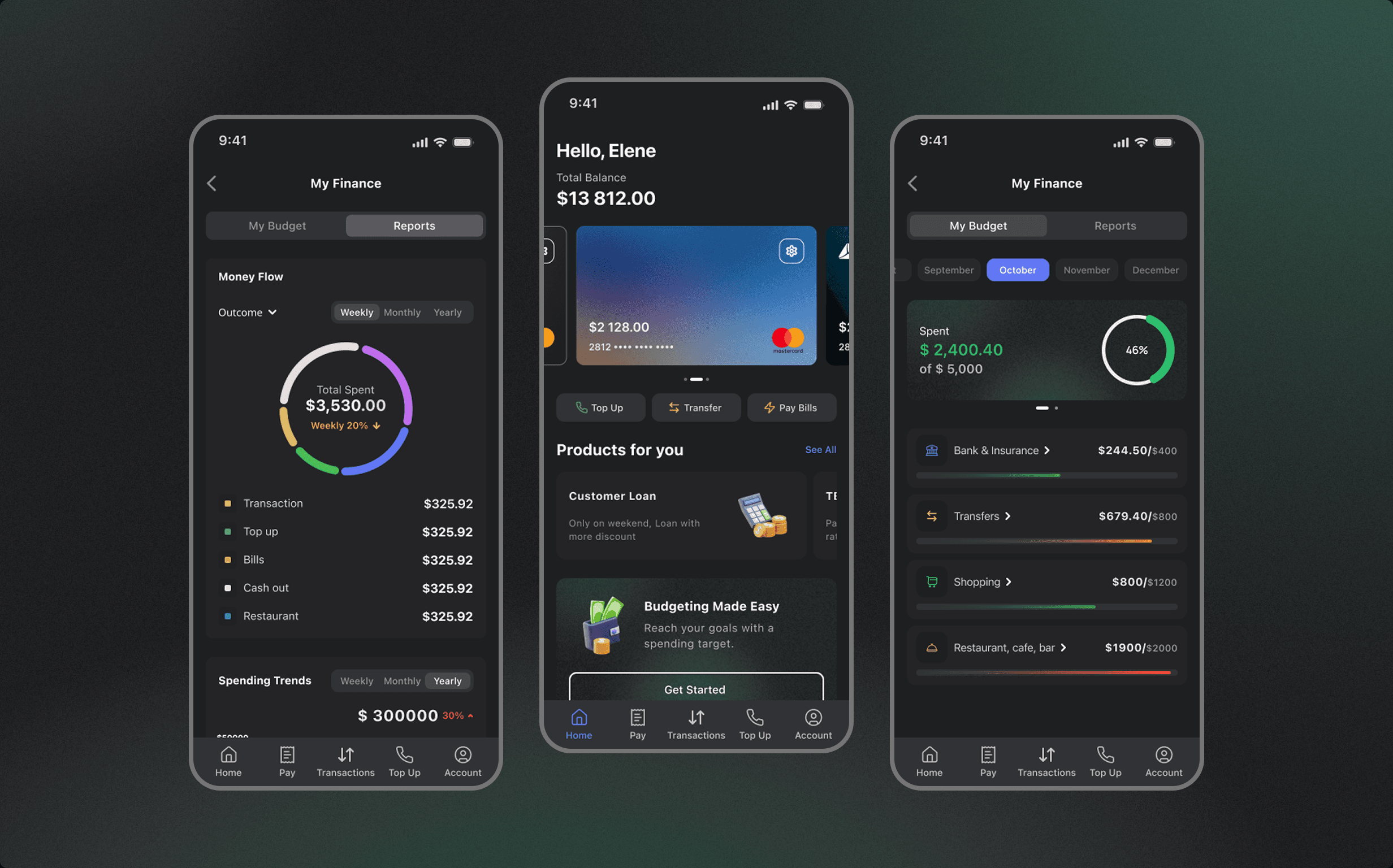
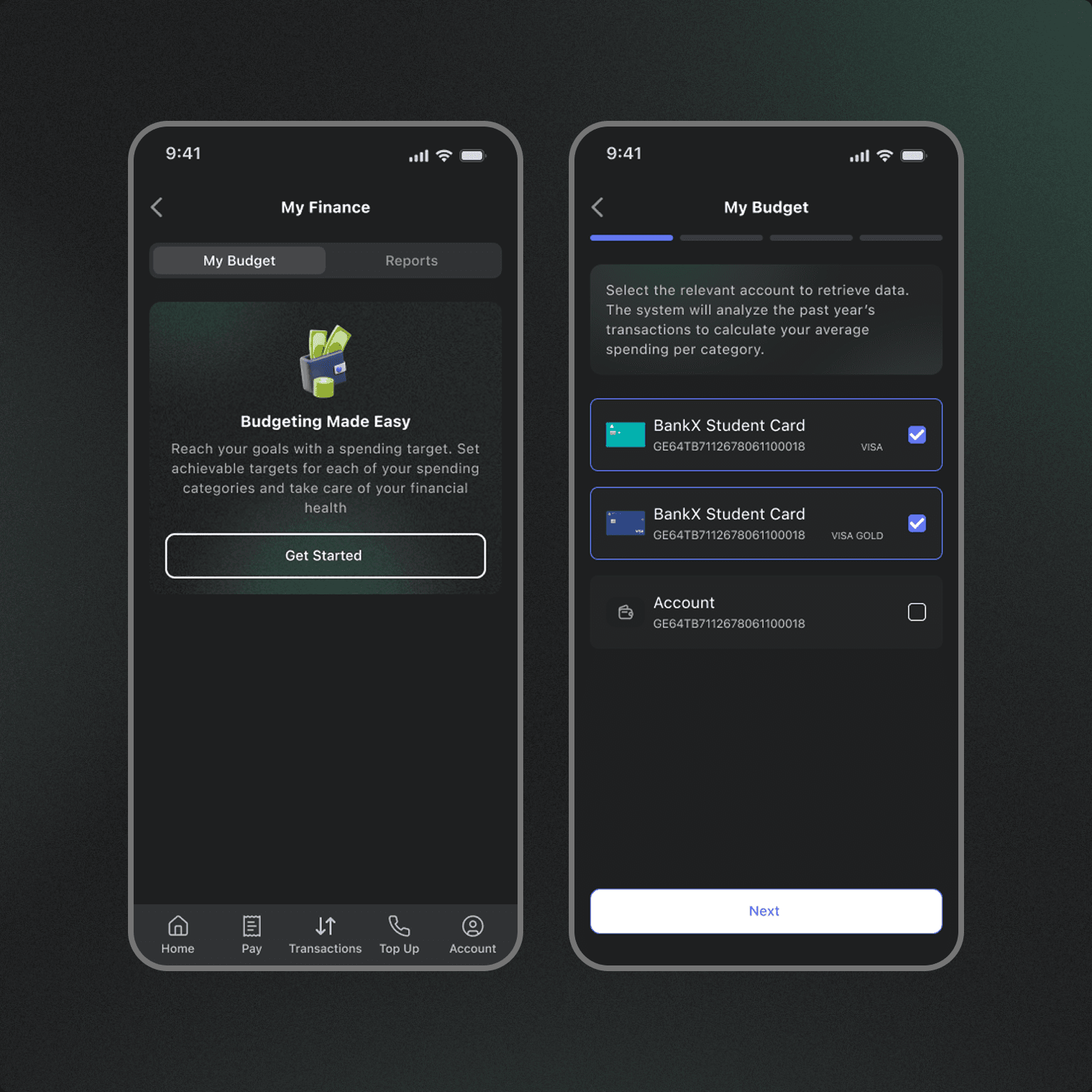
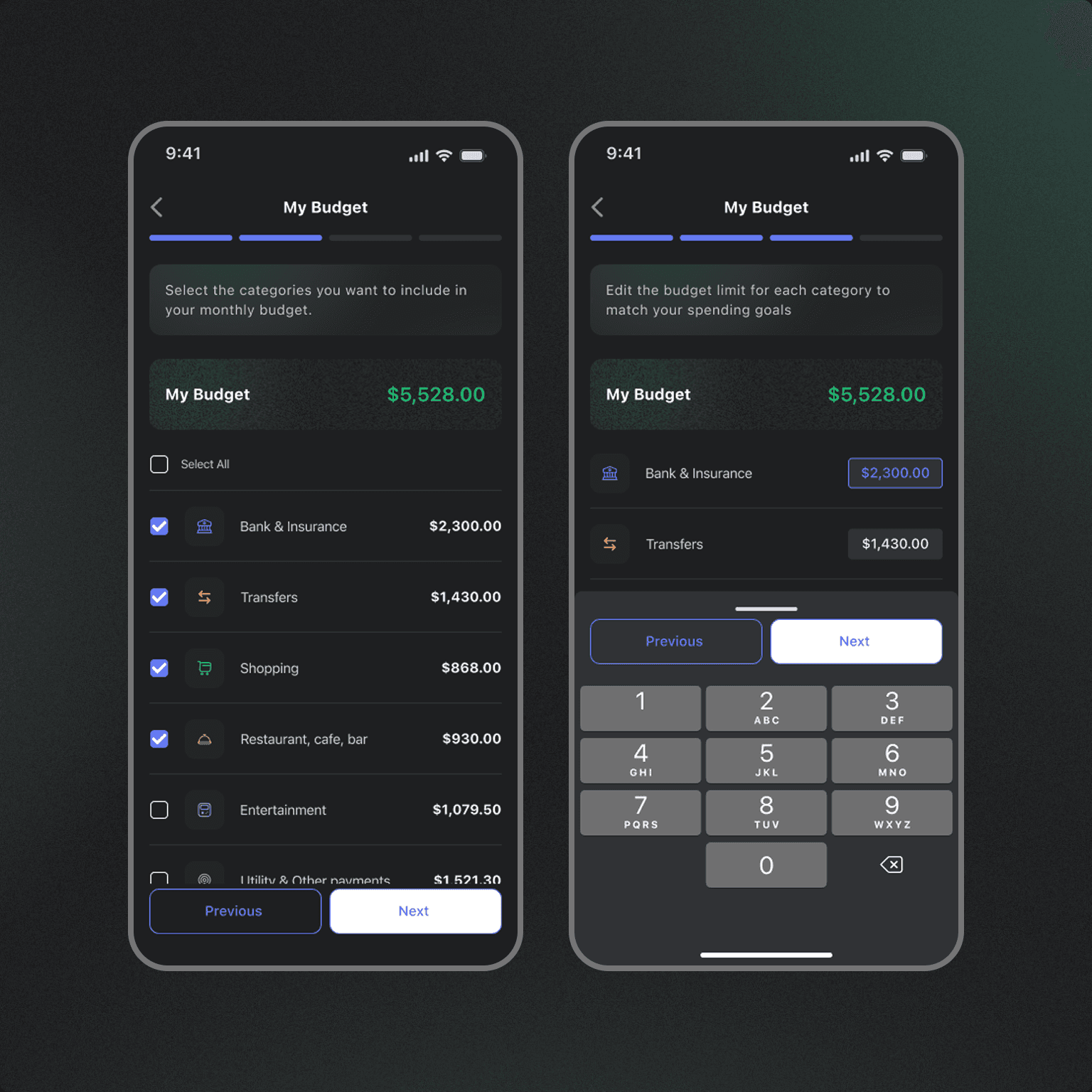
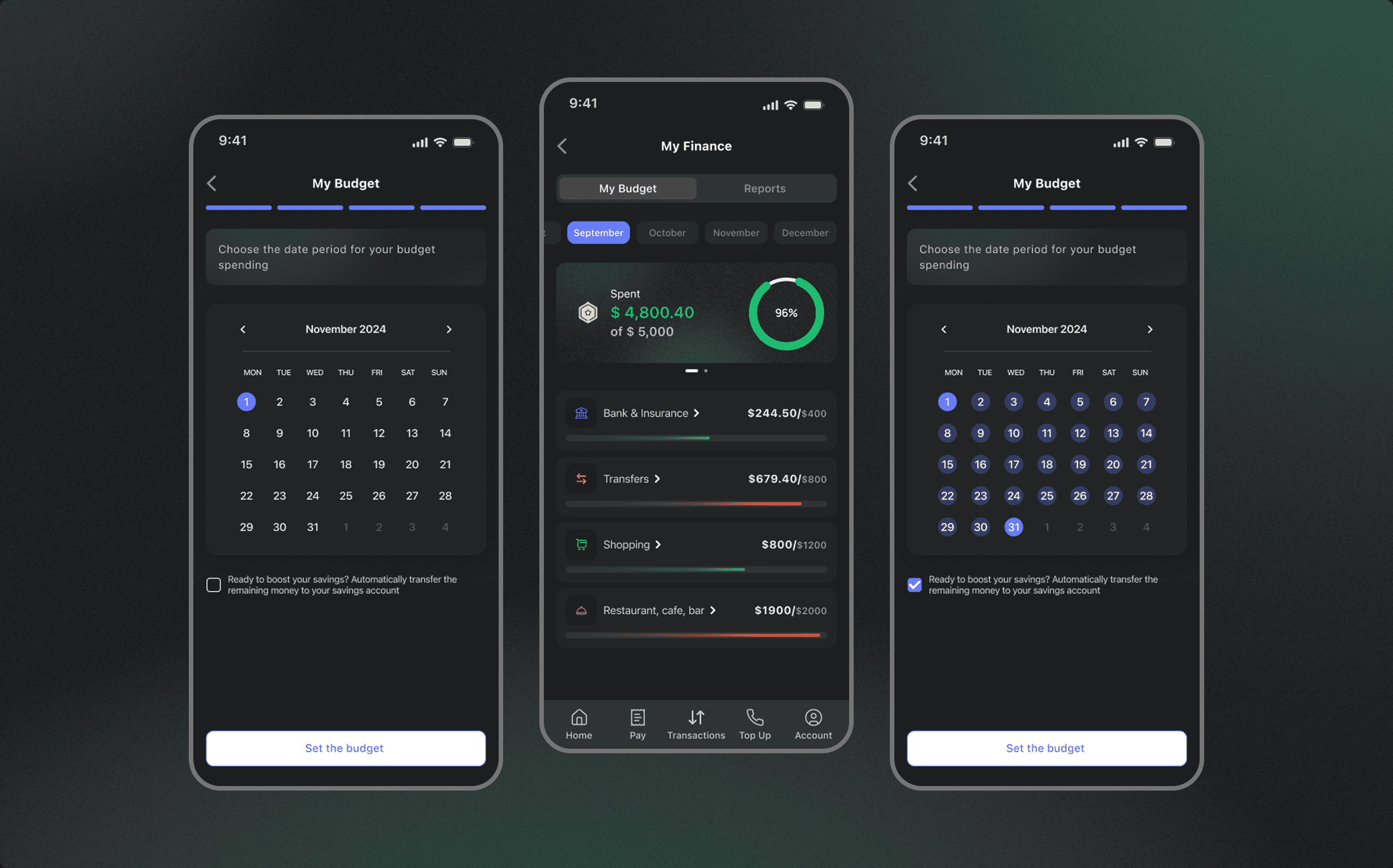
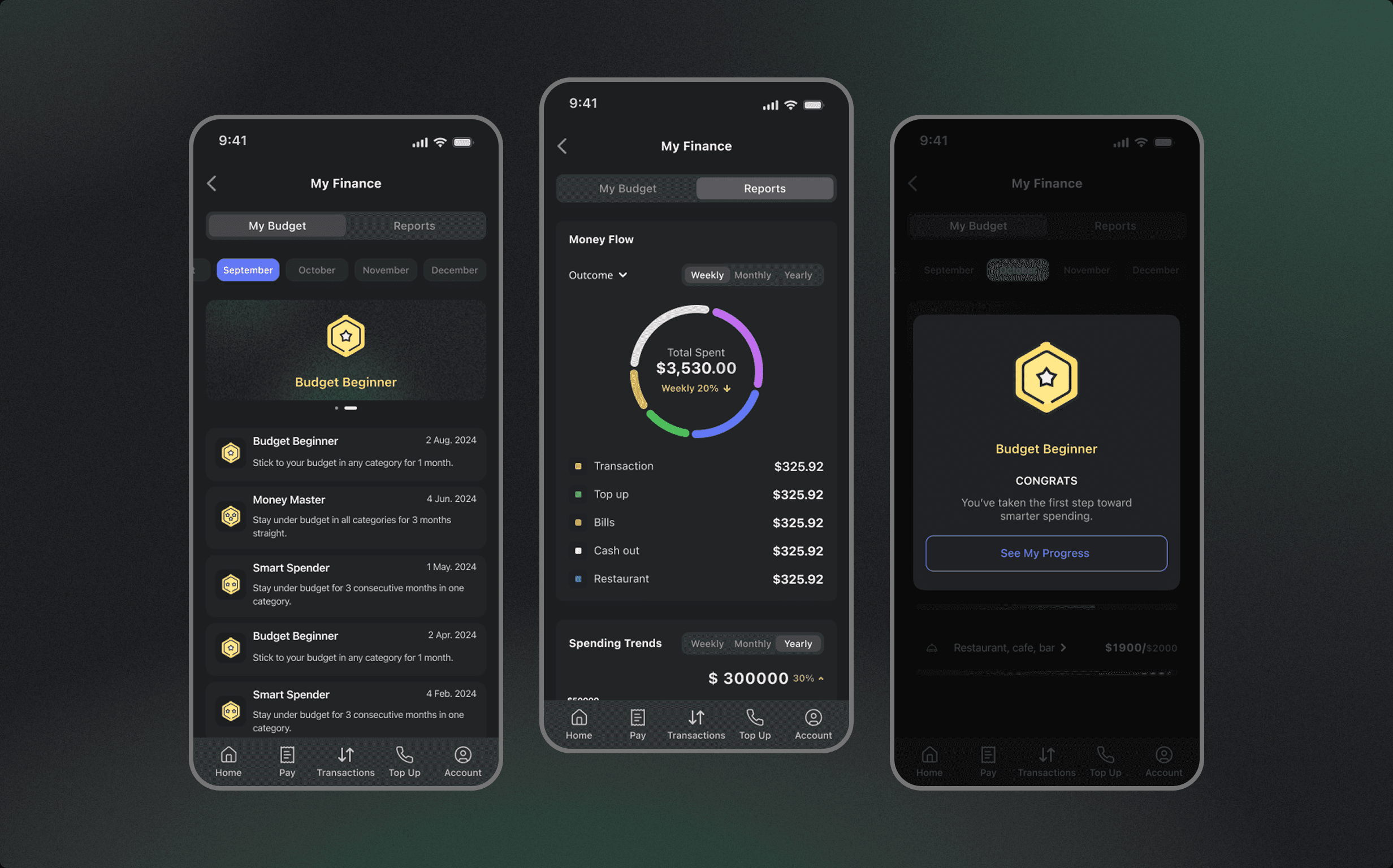
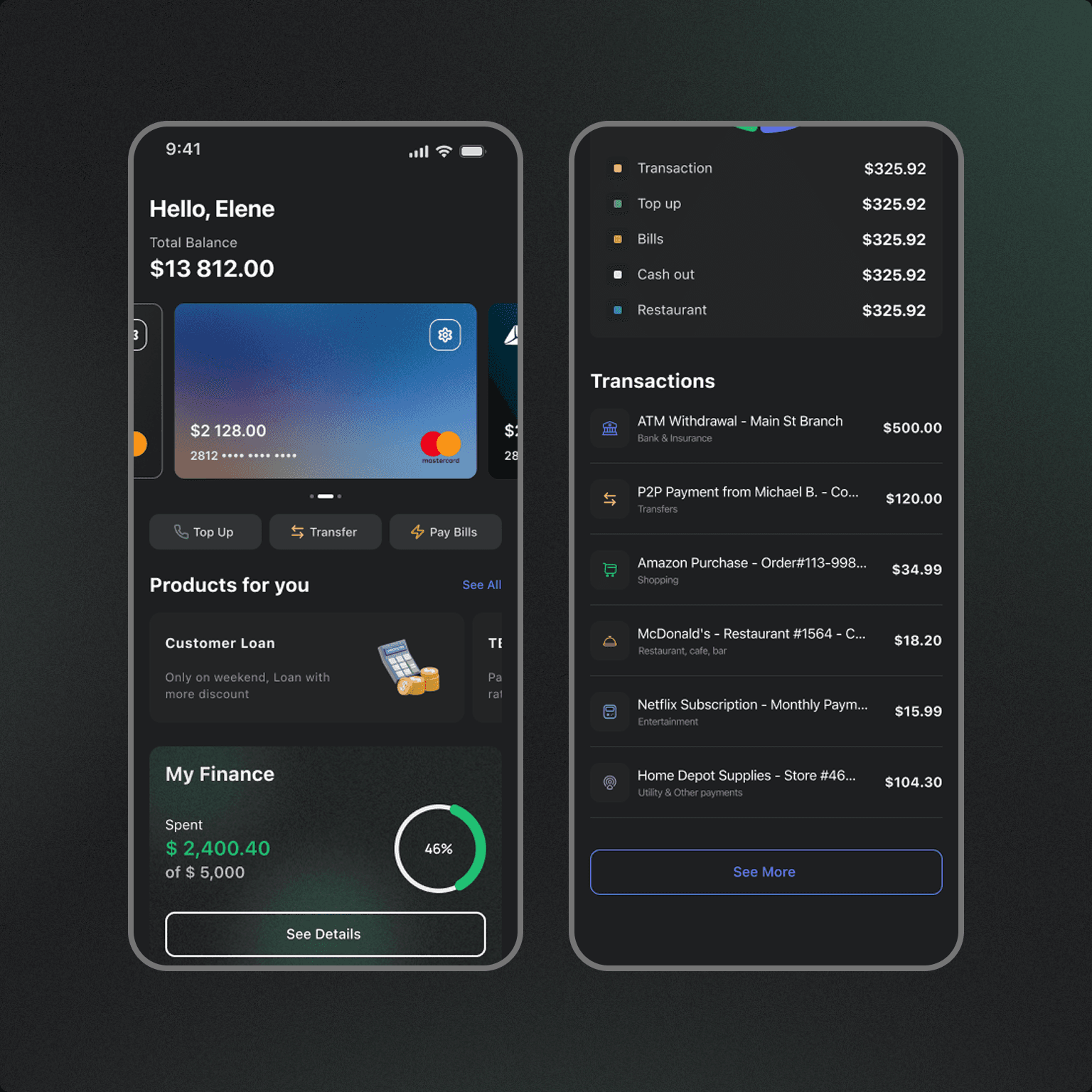
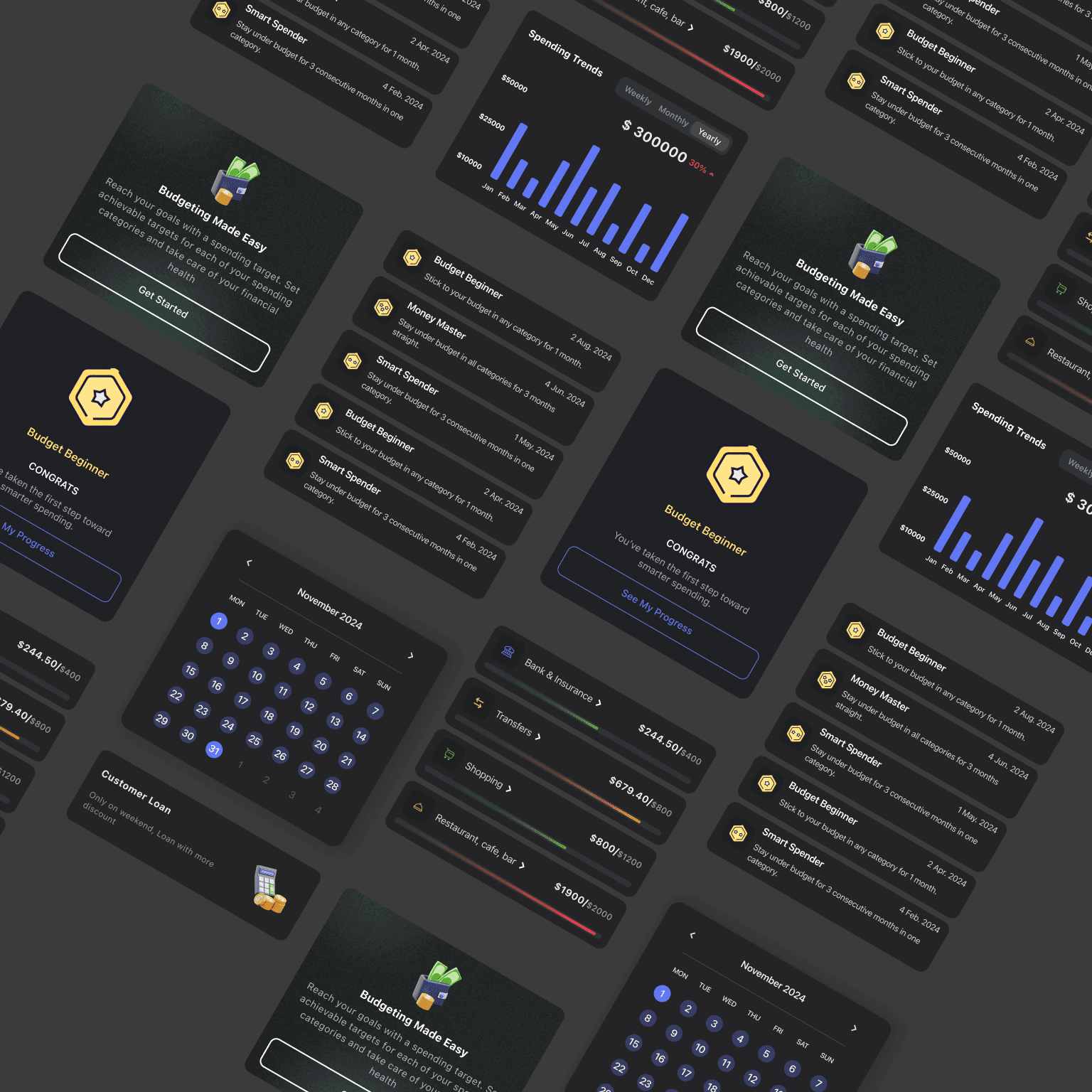
Redesigned the homepage with a clean layout, highlighting balances, recent transactions, and actionable insights.
Introduced Money Management Modules:
Expense Breakdown with category-based visualization.
Savings Goals with progress tracking.
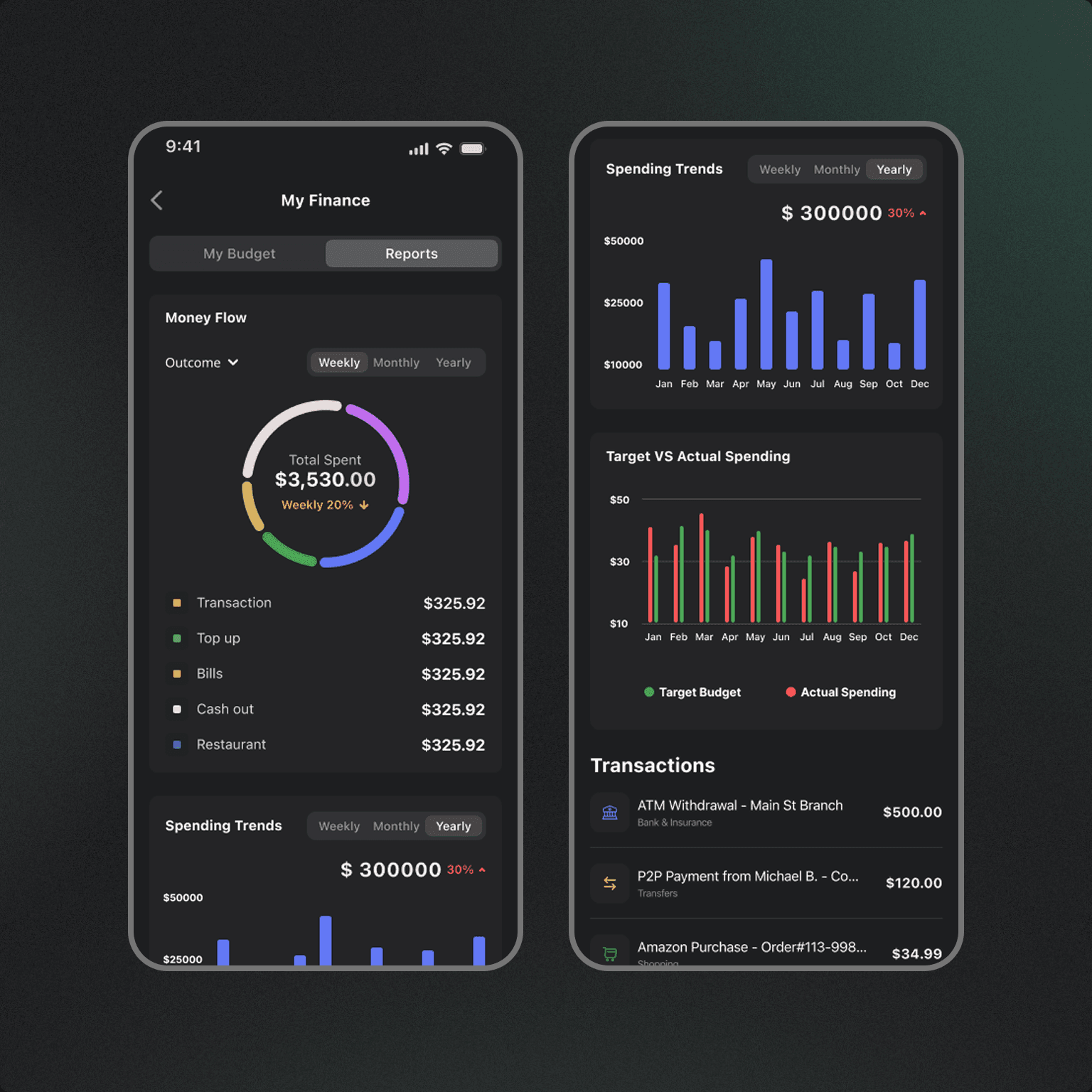
Spending Insights using simple graphs and AI-based tips.
Rewards Section with gamified incentives for reaching goals.
Prototype Testing: Conducted usability testing with 8 users and iterated based on feedback.
The design process followed a user-centered approach:
Persona Creation: Developed user personas to guide empathy-driven design.
Feature Prioritization Workshop: Collaborated with stakeholders to define MVP features.
Sketches & Wireframes: Created low-fidelity wireframes to iterate on information hierarchy.
UI Design:
Redesigned the homepage with a clean layout, highlighting balances, recent transactions, and actionable insights.
Introduced Money Management Modules:
Expense Breakdown with category-based visualization.
Savings Goals with progress tracking.
Spending Insights using simple graphs and AI-based tips.
Rewards Section with gamified incentives for reaching goals.
Prototype Testing: Conducted usability testing with 8 users and iterated based on feedback.
The design process followed a user-centered approach:
Persona Creation: Developed user personas to guide empathy-driven design.
Feature Prioritization Workshop: Collaborated with stakeholders to define MVP features.
Sketches & Wireframes: Created low-fidelity wireframes to iterate on information hierarchy.
UI Design:
Redesigned the homepage with a clean layout, highlighting balances, recent transactions, and actionable insights.
Introduced Money Management Modules:
Expense Breakdown with category-based visualization.
Savings Goals with progress tracking.
Spending Insights using simple graphs and AI-based tips.
Rewards Section with gamified incentives for reaching goals.
Prototype Testing: Conducted usability testing with 8 users and iterated based on feedback.
Challenges & Solutions
Challenge 1: Overwhelming the user with too many features.
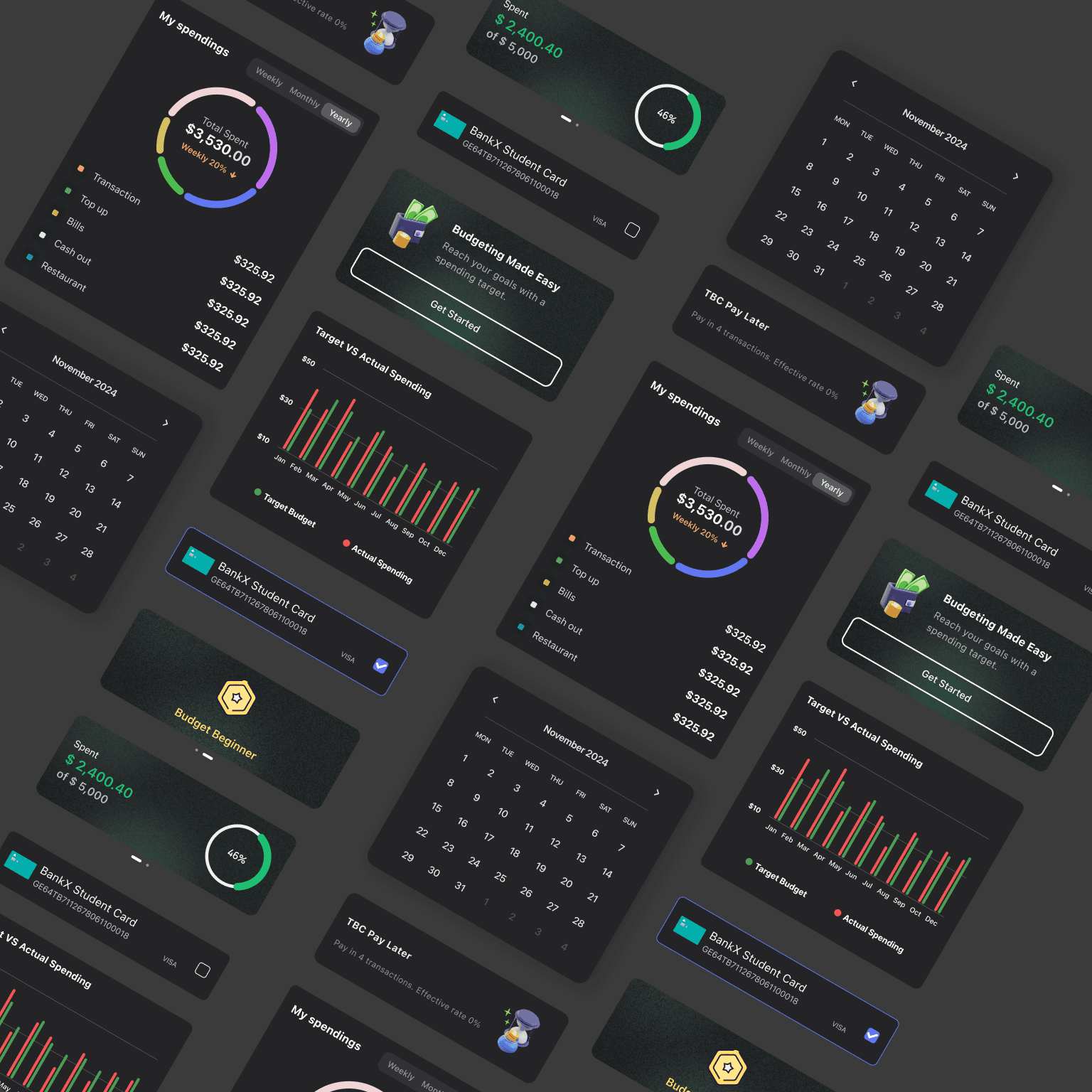
Solution: We introduced a modular homepage where users could customize which financial widgets appear first (e.g., hide/show goals or rewards).
Challenge 2: Users struggled to understand abstract financial data.
Solution: Added visual graphs and smart tips written in plain language, making insights more digestible.
Challenge 3: Balancing engagement and trust in financial tools.
Solution: Used a minimal, consistent UI with familiar financial terminology and clear privacy messaging to build user confidence.
Key Insights:
28% increase in engagement with the new homepage within the first month of release.
Positive user feedback on the clarity and usability of money management tools.
The app received a 4.6★ rating from previously 4.2★ on app stores post-launch.
Challenge 1: Overwhelming the user with too many features.
Solution: We introduced a modular homepage where users could customize which financial widgets appear first (e.g., hide/show goals or rewards).
Challenge 2: Users struggled to understand abstract financial data.
Solution: Added visual graphs and smart tips written in plain language, making insights more digestible.
Challenge 3: Balancing engagement and trust in financial tools.
Solution: Used a minimal, consistent UI with familiar financial terminology and clear privacy messaging to build user confidence.
Key Insights:
28% increase in engagement with the new homepage within the first month of release.
Positive user feedback on the clarity and usability of money management tools.
The app received a 4.6★ rating from previously 4.2★ on app stores post-launch.
Challenge 1: Overwhelming the user with too many features.
Solution: We introduced a modular homepage where users could customize which financial widgets appear first (e.g., hide/show goals or rewards).
Challenge 2: Users struggled to understand abstract financial data.
Solution: Added visual graphs and smart tips written in plain language, making insights more digestible.
Challenge 3: Balancing engagement and trust in financial tools.
Solution: Used a minimal, consistent UI with familiar financial terminology and clear privacy messaging to build user confidence.
Key Insights:
28% increase in engagement with the new homepage within the first month of release.
Positive user feedback on the clarity and usability of money management tools.
The app received a 4.6★ rating from previously 4.2★ on app stores post-launch.
ALSO VIEW MORE WORKS
Frequently
Frequently
Frequent
Asked Questions
Asked Question
Questions
What services do you offer?
Do you take on freelance or contract work?
What tools do you use in your design process?
What industries do you have experience in?
Do you work with development teams?
What’s your typical design process?
Are you open to relocation or remote work?
What services do you offer?
Do you take on freelance or contract work?
What tools do you use in your design process?
What industries do you have experience in?
Do you work with development teams?
What’s your typical design process?
Are you open to relocation or remote work?
What services do you offer?
Do you take on freelance or contract work?
What tools do you use in your design process?
What industries do you have experience in?
Do you work with development teams?
What’s your typical design process?
Are you open to relocation or remote work?